 |
| Home | Download | Instructions | Support |
PMPayment - Paypal Button modul for Joomla™
Joomla 2.5
Install instruction
First download PMPayment module; Install zip file in youre Joomla 2.5 under "Extensions".
Select and open After successful installation, module under "Extensions / Modules".
Input field Title: Write here your desired item Name. Box position: put mouse cursor in the field and write "paypal1"
. IMPORTANT NOTE: The position statement (name) is mandatory
! Set the status to "Approved".
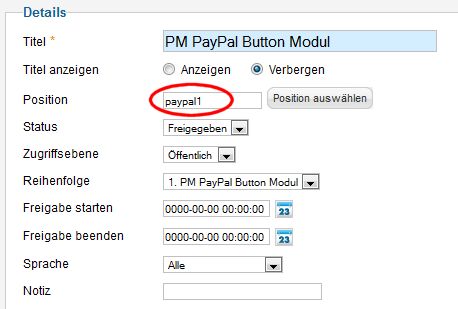
Show Title to "Hide".
Now select the appropriate contribution side, after which the module will be displayed.
Please fill out all fields accordingly. The base options include Item Details.
Under the advanced options you will find all the Paypal description here. This requires an active Paypal account.
Save Changes.
Open the required contribution page for editing.
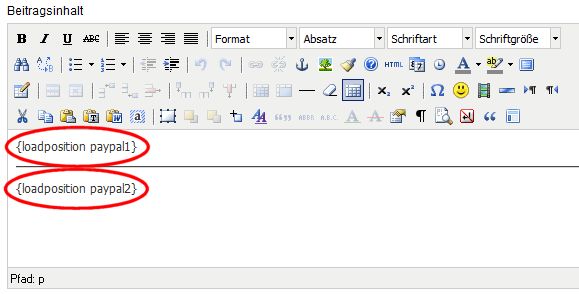
In youre site "content", write the corresponding position {loadposition paypal1}
For each additional item / module just {loadposition paypal2}, {loadposition paypal3} , etc., as shown:
Finaly, save and switch to the Preview mode.
Ready!
Imprint | Preier Media © 2013-2014